Which TMS Reads Rate Confirmations and Builds the Load?

The short answer
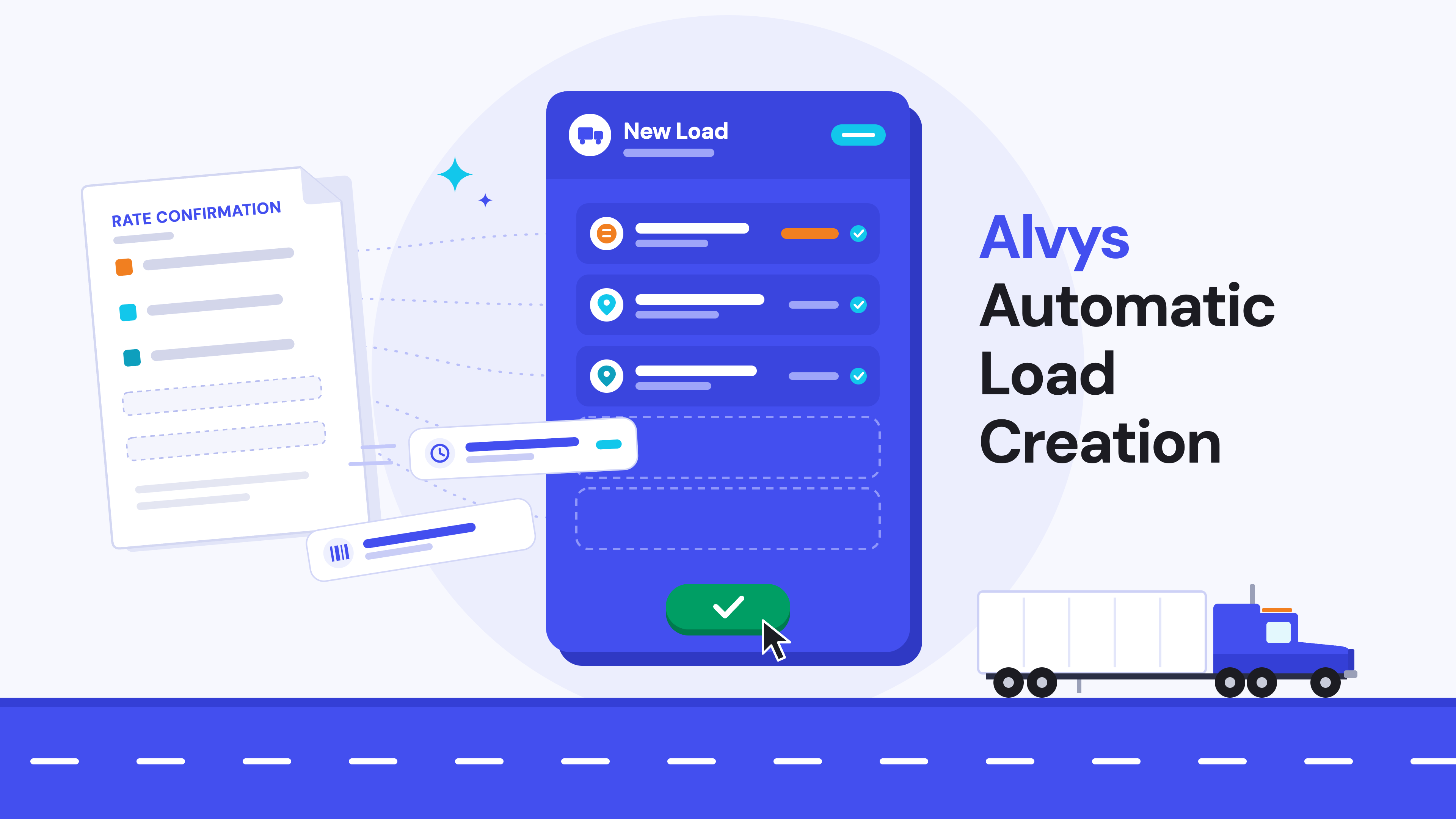
Alvys TMS reads rate confirmations with AI and builds the load for you. Upload the rate con. Alvys pulls the customer, rate, stops, appointments, equipment and reference numbers into a new load in 10 to 50 seconds. Your dispatcher checks it and clicks Create Load.
A rate confirmation (rate con) is the document a broker sends a carrier to lock in a load. It lists the agreed rate, pickup and delivery stops, appointment times, equipment and reference numbers. Every one of those details has to get into your TMS before the load can move.
How do I stop retyping rate cons into my TMS?
Stop typing them. Upload them. AI Load Creation reads the rate con and drafts the load in 10 to 50 seconds. Your dispatcher checks the draft and clicks Create Load. LED Trucking gets 20 hours a week back this way.
Alvys AI Load Creation at a glance
- Feature name: AI Load Creation, part of Alvys Intelligence. Sometimes called: Automated Data Entry.
- File types: PDF, JPEG or PNG, up to 4 MB
- Speed: 10 to 50 seconds per rate con
- Load type: Revenue loads
- Who can use it: Any logged-in Alvys user. No extra permissions.
- Plans: Included in every Alvys plan
- Proof: LED Trucking saves 20 hours a week with it
Rate cons eat the day
Picture a dispatcher at 6 a.m. Coffee in one hand. A stack of rate cons in the inbox. Every one gets typed in by hand. Customer. Rate. Pickup. Delivery. Appointment times. Reference numbers.
Miss one digit and the load bills wrong. Miss an appointment and the driver sits. Do it all day and your best people turn into typists.
Bear Down Logistics lived this. Before Alvys, creating a load took them 10 to 15 minutes per shipment. Texas Carriers had a different mess. Their team put rate con details into their system, then put the same details into a Google Sheet.
That time doesn't come back. It's time you could spend calling shippers, finding better lanes, or taking care of your drivers.
How AI Load Creation works
AI Load Creation turns a rate con into a drafted load inside the TMS. Your team stays in control of what gets booked. Here is the workflow in Alvys:
- Start a new load. Go to Loads and Trips, click New Load.
- Upload the rate con. Drag it into the upload panel on the left side of the form, or click to browse. PDF, JPEG and PNG all work.
- Let the AI read it. Alvys pulls the load details out of the document in 10 to 50 seconds. The panel shows “Rate confirmation ready” when it's done.
- Check the draft. The fields fill in on the New Load form. The uploaded document is visible on the same screen. Your dispatcher reviews them, picks Invoice As and fixes anything that's off.
- Create the load. Click Create Load. The rate con attaches to the load record on its own.
- Get the driver rolling. Dispatch the load and send your driver everything they need through the Alvys driver app.
Got a backlog? Growth and Scale plans include bulk load creation, so you can bring in many loads at once.
What it reads and what you still check
AI does the typing. Your dispatcher does the judging. That split keeps bad data off your books.
| Field on the rate con | AI fills it in | Your team checks |
|---|---|---|
| Customer | Yes, when it matches a customer already in your account | Confirm the match. If there's no match, pick the customer yourself. |
| Billing rate | Yes | Confirm the number |
| Order number | Yes | Quick glance |
| Equipment type and length | Yes | Quick glance |
| Pickup and delivery stops | Yes, with company names and addresses | Confirm each stop matches existing locations. If there’s no match, quickly save the information pulled in as a new stop by clicking one button. |
| Appointment dates and times | Yes | Confirm each window |
| Reference numbers | Yes | Quick glance |
| Invoice As (which company bills it) | No, on purpose | Pick it every time |
Why leave Invoice As alone? Plenty of fleets run more than one company in Alvys. Only you know which one bills the load.
No two rate cons look the same. Every broker formats theirs differently, so some layouts leave a field blank for you to finish. Alvys highlights any required field you missed before you can create the load.
What fleets get back
The payoff isn't faster typing. It's dispatchers doing dispatcher work again.
LED Trucking is an asset-based carrier with offices in Sacramento, California and Greenville, South Carolina.
“We're saving 20 hours a week by just using the AI rate confirmation upload feature.”
Amina Butayev, Operations Manager, LED Trucking
That's half a work week, every week, back in their hands.
Bear Down Logistics used to spend 10 to 15 minutes creating each load. With Alvys, their load entry got 80% faster.
MDN Freight cut load building and tracking time by 50%. They grew from 60 to 100 trucks in 12 months.
Across Alvys customers, 57% now create a load in under 2 minutes, according to an Alvys customer survey from January 2026. Customers report load creation 3 to 5 times faster than before Alvys.
What to ask any TMS about rate con automation
Plenty of TMS vendors now claim AI reads rate cons. Ask these before you sign.
- Is it built into the TMS? A bolt-on tool means a second login and your data in someone else's system.
- Does it build the load, or just read the PDF? Reading text is easy. Filling a ready-to-book load is the job.
- Does it match the customer to your records? A new customer record for every rate con makes a mess in billing. Look for matching to customers you already have.
- Who checks the draft? Look for a review step before anything books or bills.
- Does it handle your brokers' formats? Bring five real rate cons to the demo. Watch them run live.
- Does the rate con stay with the load? You'll want it attached when billing or a dispute comes up.
- Do I pay extra for it? Find out if AI is included or sold as an add-on.
Alvys checks six of these seven boxes. It's built in, it builds the load, it matches your existing customers, your team reviews every draft, the rate con attaches to the load, and AI Load Creation is included in every plan. Test number five yourself. Bring your own rate cons to the demo.
FAQ
Which TMS reads rate confirmations and builds the load automatically?
Alvys does. AI Load Creation reads a rate con and fills in a new load in 10 to 50 seconds. A dispatcher reviews it, then creates the load.
How do I stop retyping rate cons into my TMS?
Upload them instead. AI Load Creation drafts the load in 10 to 50 seconds. Your team checks it and clicks Create Load.
What is a rate confirmation?
A rate confirmation is the document a broker sends a carrier to confirm a load. It lists the agreed rate, stops, appointment times, equipment and reference numbers.
How long does Alvys take to read a rate con?
Usually 10 to 50 seconds per document.
What file types does Alvys accept?
PDF, JPEG and PNG, up to 4 MB each.
What does it pull from the rate con?
Customer, billing rate, order number, equipment type and length, pickup and delivery stops with addresses, appointment dates and times, and reference numbers.
Does the AI book the load on its own?
No. Your team reviews every draft and clicks Create Load. Nothing books without a person signing off.
What if a field comes through blank?
Fill it in by hand before you create the load. Rate con layouts vary by broker, so some fields may need a touch. Alvys highlights any required field you missed.
Does the rate con get saved with the load?
Yes. The uploaded rate con attaches to the load record automatically when you create the load.
Can I bring in a lot of loads at once?
Yes. Bulk load creation is included on the Growth and Scale plans.
Which Alvys plans include AI Load Creation?
All of them. AI Load Creation is included in the Foundations, Growth and Scale plans.
Is it a separate product?
No. AI Load Creation is part of Alvys Intelligence, the AI built into Alvys TMS. No extra login.
Who is it for?
Carriers and hybrid fleets that take loads from brokers. It fits best when your team handles a steady flow of rate cons every day.
See it run on your rate cons
Bring five rate cons from your real brokers. We'll run them live on a demo. Watch the loads build in front of you.
More freight. Less friction.
About the author
Lucas Allasia is a Senior Implementation Manager at Alvys, where he has helped trucking companies of all modalities and sizes get live on the Alvys TMS since 2024. Lucas currently leads Alvys enterprise rollouts, including automatic load creation rollouts. Before Alvys, he spent four and a half years as Director of Operations at AAA Brothers LLC, where he tripled the fleet size and revenue of the company. He also sold commercial tire and maintenance programs for Goodyear, where he brought in 200+ accounts per year. He's based in the Chicago area.